SQL study notes
Basic data manipulation with SQL
-
SQL clause order:
FROM --> WHERE --> GROUP BY --> HAVING --> ORDER BY --> SELECT- SQL evaluates these clauses in the order: FROM, WHERE, GROUP BY, HAVING, and finally, SELECT. Therefore, each clause receives the filtered results of the previous filter. It would look like this:
SELECT(HAVING(GROUP BY(WHERE(FROM...))))
- SQL evaluates these clauses in the order: FROM, WHERE, GROUP BY, HAVING, and finally, SELECT. Therefore, each clause receives the filtered results of the previous filter. It would look like this:
-
Create new/modify existing variables
- String functions
UPPER()&LOWER()REPLACE(var, pattern, replacement)CONCAT(var1, connection symbol, var2)SUBSTR(var, start_index, length): OracleSUBSTRING(var, start_index, length): MySqlLEN()LTRIM(),RTRIM(), &TRIM(): removing empty space in leading, trailing or bothTRIM(leading/trailing/both, char to be trimed FROM var): to remove specific char from a variableLEFT(str, length),RIGHT(): selecte certain length of string from left/rightPOSITION(substring IN string): return a numeric value, which is the index counted from left where the substring appears first in the string- Conditioning
CASE WHEN ... THEN ...
ELSE ...
END AS new_var_name
- Date functions
DATEDD: add one year to an existing dateTO_DATE: convertrs a string into dateDATEDIFF: find the difference b/t two given datesDATEPART: get year, month, or date from the date variableDAY: get day of the month for the given dateCURRENT_TIMESTAMP: get the date and time (time stamp)
- String functions
-
Using aggregate functions (COUNT, AVG, SUM, MIN, MAX)
- usually used with
GROUP BY - NULL value is elimiated in all thse functions, except for
COUNT(*)(COUNT(var)still excludes NULL records)
- usually used with
-
Apply conditions with
WHERE- use
BETWEEN ... AND...to select obs with value with a range of a variable (inclusive) - Using regular expression with
LIKE- %: any string of 0 or more character
- _(under score): any single character;
- []: any single character with the specificed range e.g. [a-f] <=> [abcdef]
- [^]: any single character not within the specified range
- use
-
Apply conditions using aggregated varaible/value with
HAVING: be clear about the differnce vsWHERE -
Converting data types
CAST(column_name AS integer)orcolumn_name::integer: convert to integer
-
Update SQL table
  UPDATE table_name
  SET column1 = value1, column2 = value2, ...
  WHERE condition;
Advanced SQL tips
Joining tables
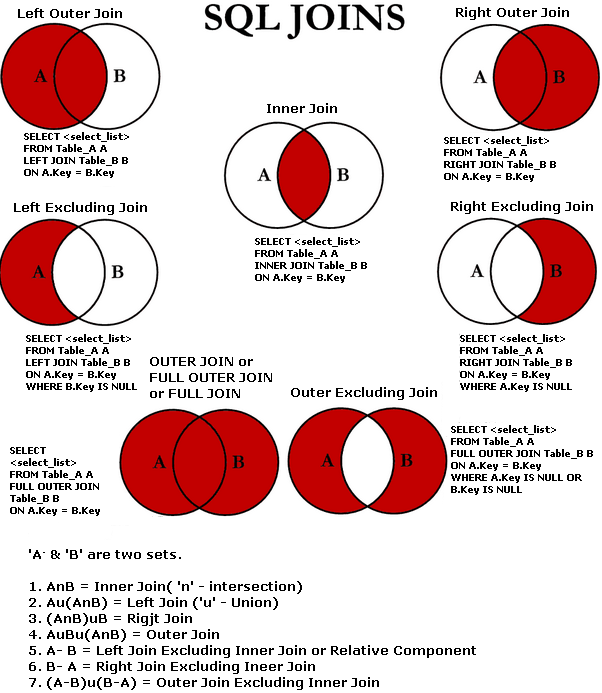
-
Filtering with "join" operations:
- using
ANDafterONclause: filtering happens before joining - using
WHEREafterONcaluse: filtering happens after joining
- using
-
Another way to visualize SQL joins: You Should Use This to Visualize SQL Joins Instead of Venn Diagrams
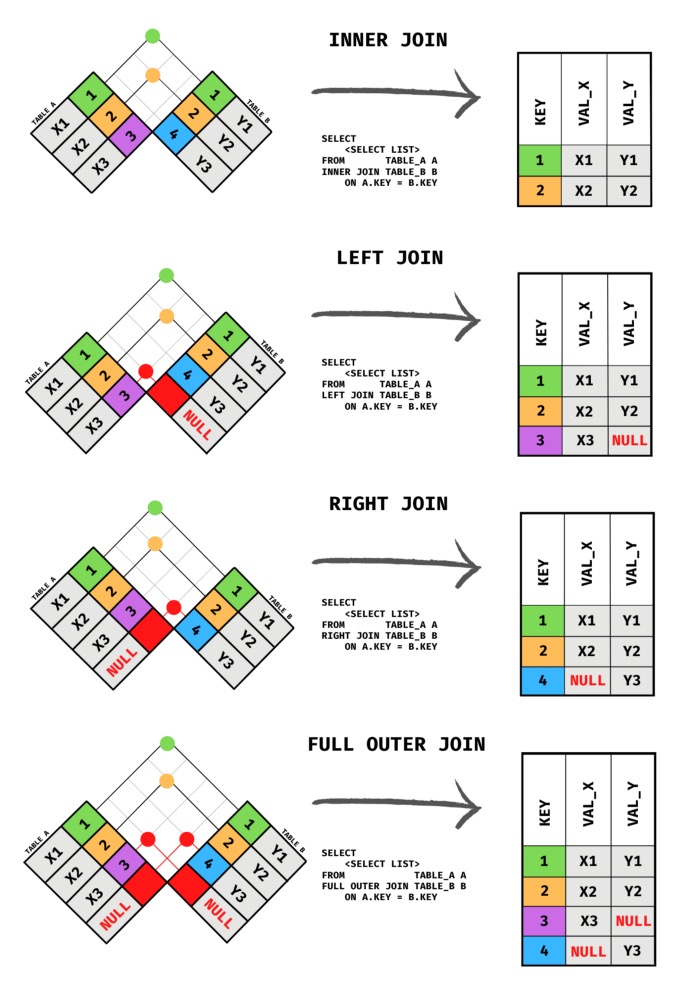
-
"Cross join": performs cross product b/t 2 tables: it connects each row in the left table with each row in the right table
Stacking tables
UNIONoperator: to stack one dataset on top of the otherSELECT var1, var2, var3 as var3_new FROM table1 UNION SELECT var1, var2, var4 as var3_new FROM table2- If there are same rows from two tables, only one unique row will be shown; or to use
UNION ALLto keep duplicates; The opposite isUNION DISTINCT - Two tables must have same # of cols
- Columns must have same data types in the same order
- If there are same rows from two tables, only one unique row will be shown; or to use
Create a view of the data table[1]:
- security of the data, giving access to only the variables included in the view table
CREATE VIEW table_name AS
SELECT var1, var2, var3
FROM table;
Subquery
- innter query/nested query: to perform operation in several steps
- subquery need to have an alias
- EXAMPLE CODE NEEDED
Window functions
-
performs a calculation across a set of table rows that are somehow related to the current row
- Example
Aggregate_fun(var) OVER
  (PARTITION BY var1 ORDER BY var2
   ORDER BY var3
   ROWS BETWEEN 1 PRECEDING AND CURRENT ROW) AS new_Var
- Example
-
This doesn't cause rows to be grouped into a single output row as done in the aggreated functions
-
Three (optional) components:
- PARTITION BY: divides the rows of the table into different groups
- ORDER BY: defines an ordering with each partition.
- The final (window) clause: defining the window frame: defines the set of rows used in each calculation. e.g.
ROWS BETWEEN 1 PRECEDING AND CURRENT ROW- the previous row and the current row.ROWS BETWEEN 3 PRECEDING AND 1 FOLLOWING- the 3 previous rows, the current row, and the following row.ROWS BETWEEN UNBOUNDED PRECEDING AND UNBOUNDED FOLLOWING- all rows in the partition.
-
Three types of analytic functions[2]
- Analytic aggretate functions
- Analytic navigation functions
FIRST_VALUE()/LAST_VALUE(): returns the first/last value in the inputNTILE(): determine the percentiles of a give value in a variableLAG() & LEAD():LAGpulls record(s) from previous andLEADpulls from following rows
- Analytic numbering functions
ROW_NUMBER(): show row # across the OVER & ORDER BY varRANK(): similar toROW_NUMBER()but will give same rank if value for ORDER BY variable is the sameDENSE_RANK(): differently fromRANK(), it won't skip rank number if there are more than one obs. records with same value share the same rank
-
Defining a window alias: a convenient way to use several window functions that use the same window:
WINDOW window_name AS
  (PARTITION BY var1 ORDER BY var2)
this should come after
WHEREclause -
Can't include a window function in a GROUP BY clause
Nested data
- SQL data can also include a column with multiple fields in it; those fields are nested inside of this column and the nested column has type
STRUCT(or typeRECORD) - To query a column with nested data, we need to identify each field in the context of the column that contains it:
C.Name: referes to theNamefield in theCcolumn.
Repeated data
- When an ID contains multiple records in another table, and we want to put the multiple records into one column and we say this conlumn contains repeated data.
- Each entry in a repeated field is an ARRAY, or an ordered list of (zero or more) values with the same datatype.
- When querying repeated data, we need to put the name of the column containing the repeated data inside an
UNNEST()function.UNNEST(Column) AS var_name; This essentially flattens the repeated data (which is then appended to the right side of the table) so that we have one element on each row.
Nested and repeated data
- A combination of nest and repeat in a column
- When reading the values, we need UNNEST and use
C.Nameto read individual field
Pivoting data in SQL (TBA)
Miscellaneous tips
IS NULL: check if it's missing valueJOINis equivalent toINNTER JOINCOALESCE(): select teh first non NULL value in a list- Use
EXPLAINat the beginning of the program, which will roughly show the complex of the program - Performance tuning SQL queries
- Table size: try to use
LIMIT XXto limit the lines to show - Joins: make joins less complicated
- Table size: try to use
- We refer to the structure of a table as its schema (something like
str()in R).
Resrouces to learn and practice SQL
- Practice SQL
- LeetCode SQL Summary
- Select Star SQL
- Hard SQL interivew questions
- 5 Advanced SQL Concepts You Should Know in 2022: for some examples
from Socratica|YouTube ↩︎
from Advanced SQL | Kaggle ↩︎